Create a New Account (Wallet)

Wallet Options

The $ POKTarrow-up-right token can currently be accessed in a sovereign wallet using the following:

Wallet
Chrome
Firefox
Mobile App

Soothe Tutorial

1

Install Soothe Vault

Go to Soothe Vaultarrow-up-right to find the browser-specific download links.

2

Add to browser

Add Soothe Vault to your browser.

3

Initialize or import wallet

Follow the on-screen instructions to initialize a new wallet or to import your existing wallet via a mnemonic phrase or a private key.

Keplr Tutorial

1

Install Keplr

Go to Keplrarrow-up-right to find the browser-specific download links.

2

Add to browser

Add Keplr to your browser.

3

Initialize or import wallet

Follow the on-screen instructions to initialize a new wallet or to import your existing wallet via a mnemonic phrase or a private key.

4

Add Pocket Network chain

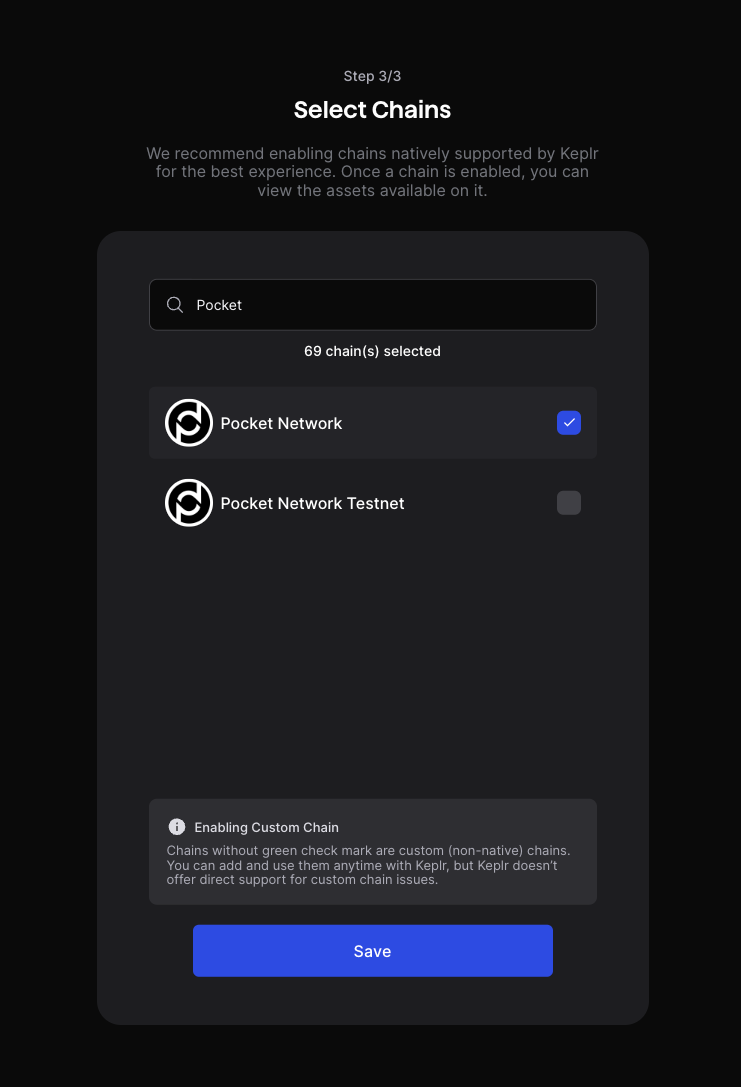
On the Select Chains screen, make sure to type Pocket Network in the textbox to add the chain to your list of chains.

Select Pocket Network in Keplr

Bridged Wallet Options

The EVM ( xERC-20arrow-up-right) implementation of the token and the Solana implementation of the token can be obtained by bridging your token via the official Pocket Network Bridgearrow-up-right. Those bridged tokens can use any wallets that support Ethereum or Solana.

Future Options

Was this helpful?